Remember the physical tether? Not only cables, but also rituals. you must sit at the desk. It must be plugged into the wall. The Internet is a place, not a tool. Then the landline modem screeching its way. Next is the Ethernet cable. This is short and expensive, but still tethering you to a single point in space.
Wireless networks are everywhere these days. But “everywhere” is often a lie. There is a dead zone. Weak signal continues. Paranoia still reigns in the hotel.
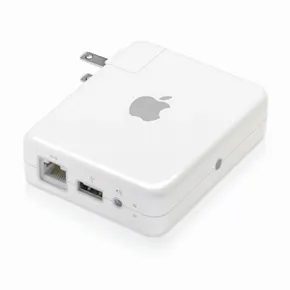
Enter the Apple AirPort Express.
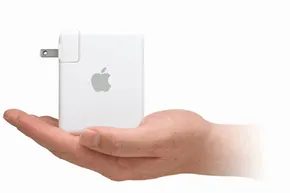
It’s more than just a router. This is a bridge. A small white plastic bridge that connects the wired past to the wireless present. At just 3.7 inches tall and 2.9 inches wide, it packs more features than most full-size routers.
Create Wi-Fi where there is no Wi-Fi
The core functions of AirPort Express are deceptively simple. It takes a wired connection (DSL, cable or Ethernet) and converts it into a wireless signal.
Connect the Express to the modem. Or an Ethernet connector. Suddenly you have a base station. You can connect up to 10 devices. that’s it. That’s the magic.
This is a huge for travelers for travelers. Have you ever stayed in a hotel room? You are chained to the desk. Work on your laptop like a peasant. Connect the AirPort Express to the port. Turn on your mobile phone. Get secure Wi-Fi. Now you can work from bed. Or a bathtub. The choice is yours.
It’s also for the gamers. Game consoles such as the Xbox and PlayStation often have an Ethernet port, but do not have a built-in Wi-Fi card. Express solves this problem. You can plug in and play online. There are no dongles. There is no adapter. It’s a little box that disappears into the setup.
Security and Standards
Don’t let the small size fool you. This supports the heavy hitters.
- 802.11b
- 802.11a
–802.11g - 802.11n
Yes, it supports Wi-Fi N. That means faster speeds. Better range. There are fewer interference.
Security is the most granular. Don’t be tied to one method. You can choose WPA or WPA2. These are modern standards. If you’re still using older hardware, you can go back to WEP, but why would you? By today’s standards, 40-bit and 128-bit WEP are ridiculous. MAC address filtering is also supported. You can whitelist devices. Keep your neighbors away.
Also works on Mac. Works on Windows. The compatibility of different platforms is not an afterthought.
Printer tips
One of the most underrated features is the USB port.
Connect a USB printer to AirPort Express. that’s it.
Now you can print wirelessly to any device on your network. There are no cables. There is no driver hell. If you are using a Mac, Bonjour will start automatically. The printer has appeared. Please find it. Print it. Done.
This turns your dumb printer into a smart printer. for 10 users. at once.
Streaming Audio Without the Wires
This is the strength of Express. It’s not for speed. For sound.
The 3.5 mm audio mini jack is not an afterthought. This is the main event of audiophiles.
Connect Express to powered speakerss. Any speakers. Old bookshelf speakerss. Stereo system in living room. Soundbar in the bedroom.
Next, stream music from your iTunes library. Wirelessly.
Works with digital or analog signals. If your speakerss are analog, Express converts the digital stream on the fly. clean. Simple.
Remote control. Use your iPhone. Or an iPod Touch. Please sit on the couch. change the track. Adjust the volume. All from your device. No need to get up. No need to touch the speakers.
It’s not just convenient. liberation from the desktop.
Extending Your Network
Do you have a big house? Or a multi-story apartment?
Wi-Fi signal is weak. They become weaker. They die in the corner.
Connect AirPort Express to your existing network. Place it in a weak spot. Receive the signal. It re-broadcasts it.
The result? The signal is getting stronger. Faster speeds. A place that was once a dead zone.
It’s a range extender. But it is wiser. It won’t slow down your connection like that
How #Apple AirPort Express and Extreme Evolution improve your home network
The hardware world has changed since Apple entered the wireless space. It’s not just about adding Wi-Fi. It’s all about downsizing the beast.
In 2004 the Airport Express arrived. It was light. It weighs less than 7 ounces on the scale. Under the hood, it runs on an 802.11g chip. The range? About 150 feet. This is the limit.
But the hardware doesn’t stand still. Two years later, in 2008, Apple updated the Express. They replaced the old chip with an 802.11n module. The results are immediate and dramatic. The range of the radio has doubled to about 300 feet. Data speeds are almost 5x faster. Although the physical structure remains largely the same, the difference in performance increases.
Why AirPort Extreme is important for power users
Express is not the only option on the shelf. If you need a little more muscle, the AirPort Extreme is for you.
Apple released the first Extreme in 2003. It shares the 802.11g foundation of Express. However, it can handle up to 50 users. Express has a limit of 10. This feature makes Extreme suitable for small businesses and large households where bandwidth contention is a serious problem.
The 2007 update to the Extreme mirrored the 802.11n update to the Express. 5x faster. This is important because the file type has changed. People send heavier multimedia. audio file. High resolution images. The old networks choked on them. The new ones handled the load.
Determine hardware performance differences
Extreme is more than just fast. The way to do it is different.
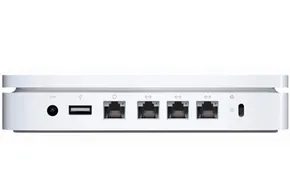
It has 3 LAN ports. The Express had fewer. Use multiple antennas. This allows you to send and receive data at the same time. These technical details can lead to measurable speed improvements.
Size is a compromise. The Extreme is larger. Size 6.5 inches. The thickness is 1.3 inches. But compare it to a traditional router. It is shaped like a box. Bulky. Very difficult to place. Apple devices are small. You can also store it away. Or hide them. For those who need a wireless access point, installation is easy.
The transition from 802.11g to 802.11n is more than just a technical data update. This is a response to changing user habits.
Keeping your data flowing requires more than just buying a box. You need to know what’s inside. The next step involves the actual configuration process.
AirPort Express is designed with Apple’s signature philosophy of being easy to look at and easy to use. The equipment works as described on the package. It turns on when plugged in. If you just want to use direct internet, there is almost no learning curve required.
But there are also pitfalls. First of all, the box does not come with an Ethernet cable. You need your own. If you are using a DSL or cable modem, connect the modem cable to the AirPort’s WAN port. No cable? You’re stuck until you hit the electronics store. If you are in a hotel, skip the modem step. Just connect your room’s Ethernet connection directly to your device.
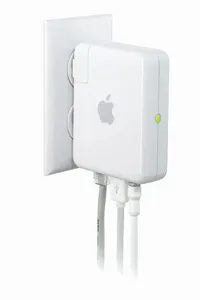
Power is equally brute-force. There is no switch. When the status indicator is plugged into the wall, it activates immediately. You’ll see a dark yellow glow while it boots. Wait for the solid, unblinking green light. This is a signal. Your device is now ready.
Here is where the old-school Apple logic bites you. There is no web interface. You do not need to log in to your browser to configure the settings. Apple forces you to install the AirPort Setup Assistant from the included CD.
The software is the only way to control your device. It acts as the central hub for everything.
The installation process is very minimal. Click Create New Network. You type in a name. You set a password. that’s it. Once a wireless device is registered, it can immediately recognize a new network.
There is no web-based control panel, so you have to use desktop software to change settings.
But that’s just the surface. The actual work takes place after the basic connections. We’ll look at how to actually shape that traffic in the next section.
Networking is only half the story. The real magic happens when you stop thinking of AirPort Express as a boring router and start using it as a media center.
We need to bridge the gap between devices and stereos. This means using an analog mini-plug cable or an optical digital cable. Don’t expect what’s in the box. You have to buy it yourself. Connect one end to the AirPort Express and the other end to your speakers.
After connecting the hardware, launch the AirPort Setup Assistant. Create a new network. Open iTunes. Look for the pop-up window in the lower right corner of the user interface. Select your new speakers from the list.
Click Play. Music plays through large speakers. It works. Mostly.
There is a catch. Playback can only be controlled via iTunes. If your iTunes library is on a desktop computer stuck on your desktop, you’re in trouble. Want to go from Blake Shelton to Miranda Lambert? You need to get back in front of the computer. If you’re using an iPhone or laptop, no problem. You can walk around. If you’re tied to a fixed machine, you’re stuck.
Wireless printing, no cables needed
Forget dongles. You can print wirelessly by connecting the Express directly to your printer with a standard USB cable. Next, find the printer on the network using your computer’s operating system. It just works. If the basic network settings are done correctly, there is no need to fiddle with drivers.
Extend your Wi-Fi range
Need more signal in your bedroom? Expand your existing wireless network with Express. Obviously you need an existing connection first. This does not apply if you do not have a Wi-Fi connection.
When you plug the AirPort into an outlet, the current signal starts to weaken. Reload the Setup Assistant. Use the configuration utility to manage your new node. It grabs the existing signal and rebroadcasts it further out.
Whether you choose the Express version or the more powerful Extreme version, Apple devices allow you to transfer data anywhere. Music. Video. Documents. Easy installation enables data acquisition from the ground to the sky.
Apple Airport Express Frequently Asked Questions
What does Apple AirPort Express do?
Create a wireless access point for fast connections. Deliver multimedia to your devices and extend the range of your current Wi-Fi network.
How to enable Apple AirPort Express?
Connect your DSL or cable modem to the Express with an Ethernet cable. Connect your device to a power source. There is no power switch. The status light should turn solid green when it’s ready. Install the Setup Assistant from the supplied CD. Follow the instructions. Select “Create a new network”. Set a password. Your devices will see it immediately.
What is the alternative to Airport Express?
Nothing. Apple didn’t replace it with a direct successor. They stopped updating after 2012. They sold two other routers, the AirPort Extreme and the AirPort Time Capsule.
Has Apple AirPort Express been discontinued?
Yes. Apple retired all routers in 2018. Express may still work, but if it breaks, you can’t buy a replacement.
Why is my AirPort Express blinking yellow?
A flashing yellow light (as Apple says) means that a firmware update is waiting to be installed on your hardware.