


So, what is Tumblr?
It’s a network of millions of personal websites. It’s part blog, part social network, and entirely chaotic in the best way. Think WordPress for the lazy, or Instagram for the text-obsessed. You post original content. Written entries, photos, video clips, links. You share them with friends and followers who just want to see what you’re into.
Tumblr isn’t just a feed. It’s a collection of curated micro-sites.
You subscribe to people. Their stuff hits your Dashboard. You reblog it, like it, or reply. You can sync with Facebook, Twitter, Instagram. The social graph expands, but the core mechanic stays simple.
It’s easy to start. Sign up with email. Pick a name. Blog.
But why does it still exist?
Why Tumblr Feels Different From Other Social Networks
Tumblr calls itself a microblogging platform. The term “tumblelogging” predates the site. That’s where the name comes from.
Launched in 2007 by David Karp and Marco Arment. Two weeks later, 75,000 people were on it. The interface hasn’t changed much since. In 2009, they bought Tumblrette, an iPhone app that simplified the experience. Now it’s on every smartphone.
The numbers tell a story of flux.
Tumblr has 135 million monthly active users globally. That’s significant. But it’s also a site that survived a massive policy shift.
In 2018, Tumblr banned adult content.
Traffic dropped. Hard. From a peak of 521 million visitors in 2018 to 213 million in 2023. Yet, as of April 2023, it was still the 103rd most visited website in the world, with 222.7 million visitors. It didn’t die. It just changed.
People still go there. For what?
How to Actually Use Tumblr
It’s like email.
- Sign up with an email and password.
- Choose a username. (This doesn’t have to match your blog title.)
- Start posting.
The Dashboard guides you. You’ll see icons for text, photo, quotes, links, chat, audio, or video. Click one. Add your material. Hit “post.” Or queue it. Or schedule it for later.
You can have multiple blogs. This is key.
Tumblr is a social network, but the connection happens through subscriptions. When someone you follow updates, it appears in your Dashboard.
The Dashboard is your home base. It’s like the Facebook News Feed, but for content you actually chose to follow. Posts appear in reverse chronological order. Newest on top.
Tip: Press “J” to scroll through posts faster. It’s a small quality-of-life thing that makes the site feel faster.
Notes, Reblogs, and the Social Graph
How do you interact? Through “notes.”
From the Dashboard, you can engage with posts in several ways:
- Reblog: Click the arrow. The post appears on your own site, with your commentary attached.
- Like: Click the heart. A silent nod of approval.
- Reply: Click the speech balloon. Leave a text comment, if the author allows it.
- Photo Reply: Click the camera. Respond with an image, if enabled.
Every post has a number. That’s the total note count. Click it. You see who liked it, who reblogged it, and what they said.
This is how you find new blogs. You look at who liked the same thing you did. You visit their sites. You follow them. The network grows organically.
There’s a sidebar too. It shows your likes, your follows, and suggestions. You can pay to feature your blog there, or pin it to the top of subscribers’ dashboards. A small fee for visibility.
But content is only half the battle.
How does it look?
Customizing Your Tumblr: Themes and Layouts
Your blog is your space. It should reflect you.
Tumblr lets you tweak the visual experience. You aren’t stuck with a default template.
You can change themes. Backgrounds. Layouts.
This is where Tumblr separates itself from the rigid grids of Instagram or the text-heavy feeds of Twitter. It’s yours. You control the aesthetic.
In the next part, we’ll dig into how to make that aesthetic work. How to pick a theme that fits your content. How to layout your sidebar so it doesn’t look like spam.
Because on Tumblr, how you look matters almost as much as what you say.
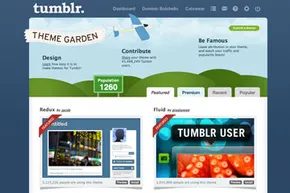

customizing your tumblr theme for the best look
You can change the Tumblr dashboard appearance without writing a single line of code. That is the main draw. Most people just want their blog to look good, not to wrestle with CSS. Tumblr offers dozens of free templates, called Themes. These cover everything from text-heavy newspaper layouts to high-res photo galleries. There are single, double, and triple column options. You pick what fits your content.
Go to your site page on the Dashboard. Click the customize theme module. A pull-down menu shows thumbnails. Many are designed by other users. It is a community effort. Most themes are free. Some are premium, paid through Tumblr. It is up to you.
Once you pick a theme, install it. One click. You see a dummy page. This is where the real tweaking happens. Change the background color. Upload a pattern or image. Adjust entry text size and color. Set the site title and description. Decide how many old posts show up. You can even inject user-generated code if you know what you are doing. If you want more control, use the HTML editing mode. This is for the code-savvy or those who need a specific look.
adding music to tumblr posts and blogs
Music is a big part of the Tumblr experience. It distinguishes the platform from other social media. You can add audio in two ways. Individual posts or background music for the whole site.
For individual posts, use the audio post option. On the navigation bar, look for the purple headphones icon. Click it. A new window opens. It does not have a title bar. It has a search bar with a magnifying glass. Upload an MP3 file from your computer. Keep it under 10 MB. Or paste a URL from the internet.
Tumblr partners with Spotify and SoundCloud. This makes sharing easy. Spotify has major label tracks and independent music. SoundCloud has user-generated content, often from unsigned bands. Both provide shareable web addresses. Paste those links into the audio post window. The player appears. Done.
Background music is different. It plays on every page of your blog. This requires a third-party plug-in. Upload the music to the service. It generates HTML code. Copy that code. Paste it into your Tumblr theme customization portal. You can also add an opt-out button for autoplay. This is polite. If you want autoplay on just one post, do it in the HTML editor when writing that specific post.
is tumblr still relevant in 2024?
Yes. Tumblr is still active in 2024. It is not dead. It is just different. People use it for blogging. Also for social networking. Microblogging is common too. Multimedia content gets a lot of attention. It remains a hub for niche communities. The interface is simple. The customization options are deep. That combination keeps people coming back.


