You have spent hours editing, posting, and hoping for the algorithm to pick you up. The engagement is real. The views are climbing. But your bank account looks exactly the same as it did last month. If you are asking how the TikTok money withdrawal process actually works, you are not alone. Many creators hit a wall where they have an audience but no way to access their earnings.
TikTok is not just a video sharing app. It is a potential revenue stream. But turning those virtual credits into real cash requires specific steps and eligibility checks. You cannot just click a button and wait for a check to arrive. The platform has strict rules, and missing one means your money stays locked in the app.
Getting into the TikTok Creator Fund
The first hurdle is access. You need to qualify for the TikTok Creator Fund. This is the primary mechanism for paying out content creators who meet specific performance and follower thresholds.
- You must be at least 18 years old.
- You need a minimum of 10,000 followers.
- You must have received at least 100,000 video views in the last 30 days.
If you meet these criteria, you can apply through the Creator Tools section in your profile. Once accepted, you gain access to the Creator Center. This is where you track your estimated earnings. But tracking them is not the same as withdrawing them. That comes next.
How TikTok Creator Rewards replace the old fund
The old TikTok Creator Fund is gone. It served its purpose for years, paying users based on video performance and view counts. But the platform shifted gears. Now, if you want to turn your content into cash, you are looking at the TikTok Creator Rewards program. This is the direct successor to the fund. Same goal, different mechanics.
To get in, the bar is high. You need at least 10,000 followers. That is non-negotiable. You also need 100,000 video views in the last 30 days. Miss that number, and the application is dead on arrival. Once you clear those hurdles, you can apply. If approved, TikTok unlocks the ability to monetize your organic reach. No more guessing if your viral hit will pay rent. It is a direct link between your audience engagement and your bank account.
The shift from the Creator Fund to Creator Rewards signals that TikTok wants to reward quality retention over raw, fleeting views.
Why payment setup breaks more creators than eligibility
Getting approved is the easy part. Most people stall here. TikTok payment settings are where the friction lives. You cannot just pick any bank. The platform requires specific banking details that align with your creator account region.
You need to configure your payout method before the first check hits. This usually means linking a bank account or, in some regions, a PayPal address. The catch? The name on the bank account must match the name on your TikTok profile exactly. A single mismatch, a middle initial, or a corporate account instead of personal, triggers a rejection.
- Banking details: Must be from a supported country.
- Name matching: First and last name must align with your ID verification.
- Tax information: You will need to submit a W-9 (for US) or equivalent tax form.
If you skip this step, or if the data is slightly off, you will see a “payment failed” error. This is not a glitch. It is a compliance check. TikTok has to follow financial regulations. They cannot send money to an account that does not verify the identity of the recipient. So, before you post the next viral dance, double-check your banking info. It saves weeks of support tickets.
Which regions still have limited options?
Not every country gets the same menu. While the US, UK, Germany, and France have full access to the Creator Rewards program, other regions operate differently. Some countries still use the older TikTok Creator Fund structure, or they are simply not eligible for direct cash payouts at all.
If you are in a region with limited options, you might be forced to use the TikTok Shop for monetization instead. This changes the game entirely. You are no longer paid for views. You are paid for sales. It is a harder path, but it is the only path available for many creators outside the top-tier markets.
Where are you located? That is the first question to answer before you even think about chasing that 10,000 follower milestone. The platform’s ability to pay you depends heavily on your zip code.
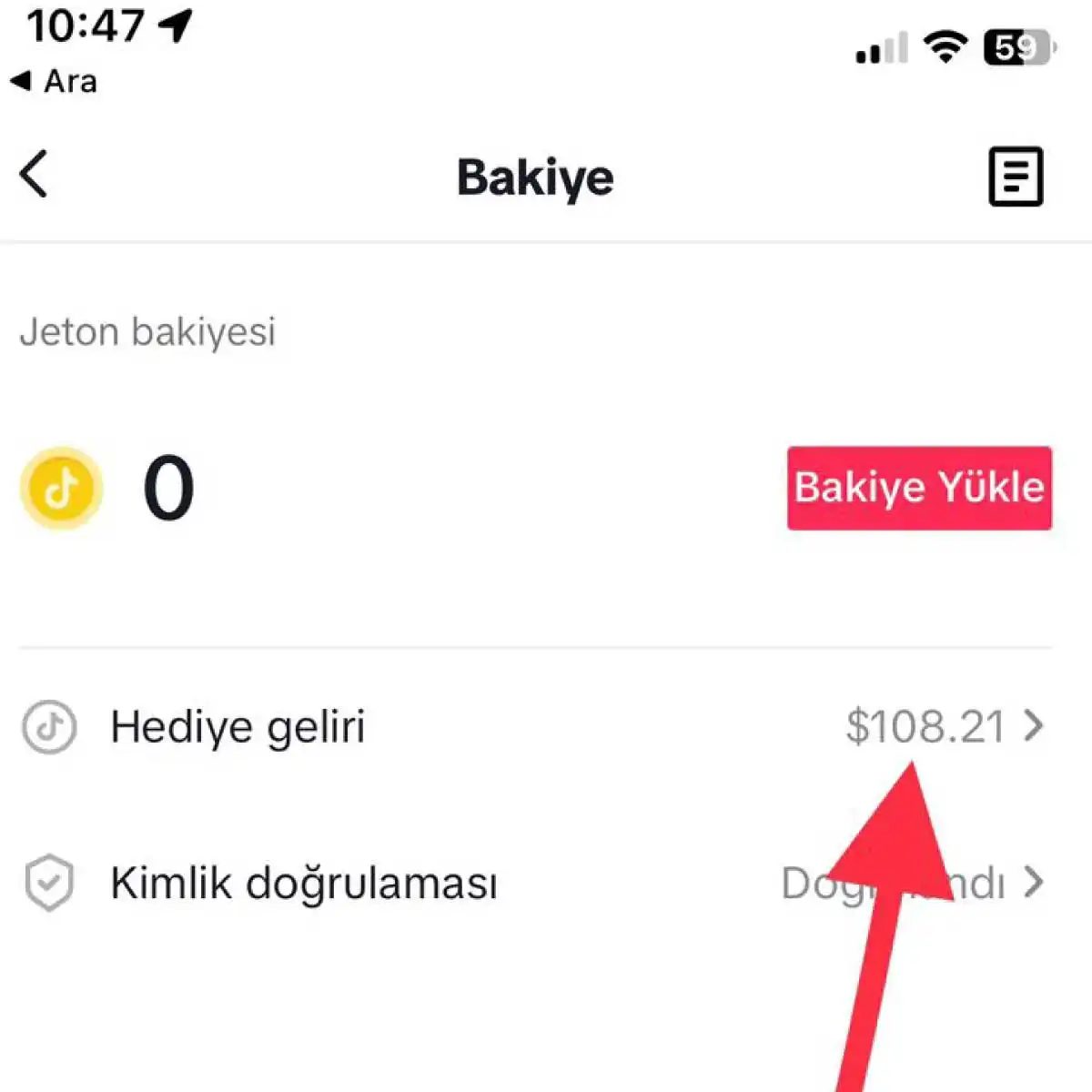
3. Gelirinizi İzleyin ve Çekilebilir Duruma Getirin
Para çekmek için ödeme ayarlarınızı yapılandırmanız gerekmektedir. Bunun için TikTok profilinize gidin ve sağ üst köşedeki üç noktalı menüyü seçin. Ardından “Ayarlar ve Gizlilik” bölümüne girin ve “Ödeme Ayarları” seçeneğini bulun. Bu bölümde, para çekme seçeneklerinizi belirleyebilir ve ödeme bilgilerinizi ekleyebilirsiniz.
TikTok, çekilebilir tutarları ve para çekme işlemlerinin düzenli olarak gerçekleşmesi için gerekli bilgileri sağlamanızı isteyecektir. Hesabınızın bankanıza veya ödeme sağlayıcınıza nasıl bağlandığını kontrol etmek için bu adımı atlamayın. Yanlış bir IBAN veya hesap numarası girerseniz, paranız yolda kaybolmaz ama geri dönüş süreci canınızı sıkabilir.
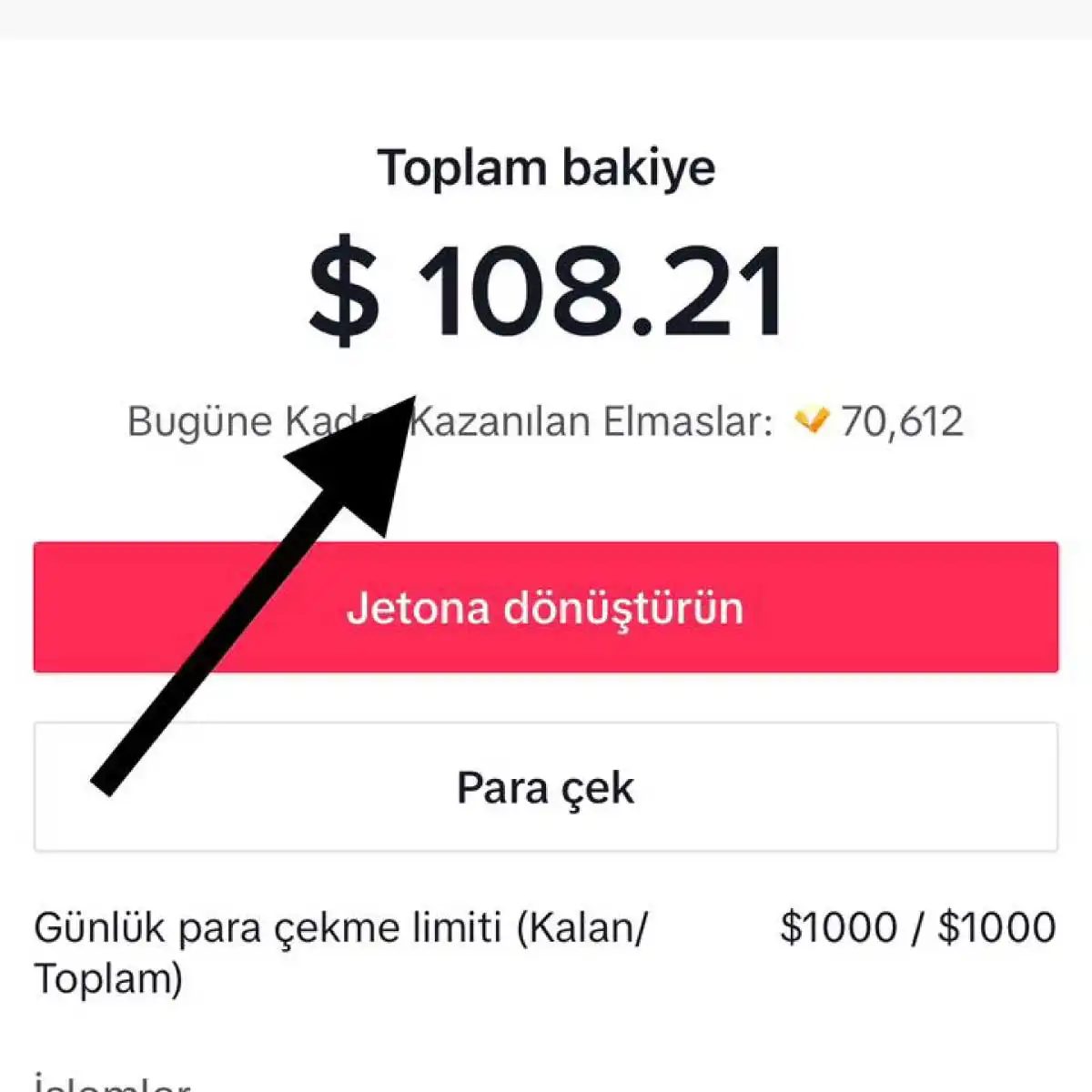
Ödeme bilgileriniz onaylandıktan sonra, kasanızın nasıl çalıştığını anlamak zaman alır. “Çekilebilir bakiye” ile “bekleyen kazanç” arasındaki farkı netleştirin. Bekleyen kazançlar, platformun sahtecilik veya kural ihlali kontrolünden geçmedikçe hesabınıza geçmez. Bu süreç genellikle birkaç gün sürer. Sabırsızlanmak için bir neden yok, sadece sistem işlemesini bekleyin.
Nasıl çalışır? TikTok, belirli bir eşik değerine ulaştığınızda otomatik olarak havale yapar. Bazen ayda bir, bazen iki haftada bir. Tercihleriniz “Ödeme Ayarları” menüsünde saklıdır. Buradan hangi yöntemi seçtiğinizi ve ne sıklıkla ödeme aldığınızı görebilirsiniz.
Hesabınızın durumunu düzenli olarak kontrol edin. Geliriniz neden çekilebilir durumda değilse, eksik bir belge veya tamamlanmamış bir kimlik doğrulama adımı olabilir. Bu tür durumlarda uygulama genellikle bildirim gönderir. Bildirimleri görmezden gelmeyin.
“Ödeme Ayarları” bölümü, paranızın nereye gideceğini belirlediğiniz yerdir.
Hata yaptığınızı düşünüyorsanız, önce basit şeyleri kontrol edin. Banka detayları doğru mu? Hesap adınız, TikTok’taki kullanıcı adınızla birebir örtüşüyor mu? Bazı finansal kurumlar, hesap adı ile gönderen ad arasındaki küçük bir fark için işlemleri reddeder.
Sonunda, para çekme talebinde bulunduktan sonra işlem süresini takip edin. Genellikle 3-5 iş günü sürer. Bu süre, bankanızın ne kadar hızlı işlem yaptığını da etkiler. Hafta sonları ve resmi tatilleri hesaba katın.
TikTok’ta para kazanmak sadece video çekmekle bitmez. Arka plandaki finansal mekanizmayı anlamak, paranızın cebinize ne zaman ve nasıl gireceğini bilmenizi sağlar. Ayarlarınızı bir kez değil, her değişiklikte kontrol edin.
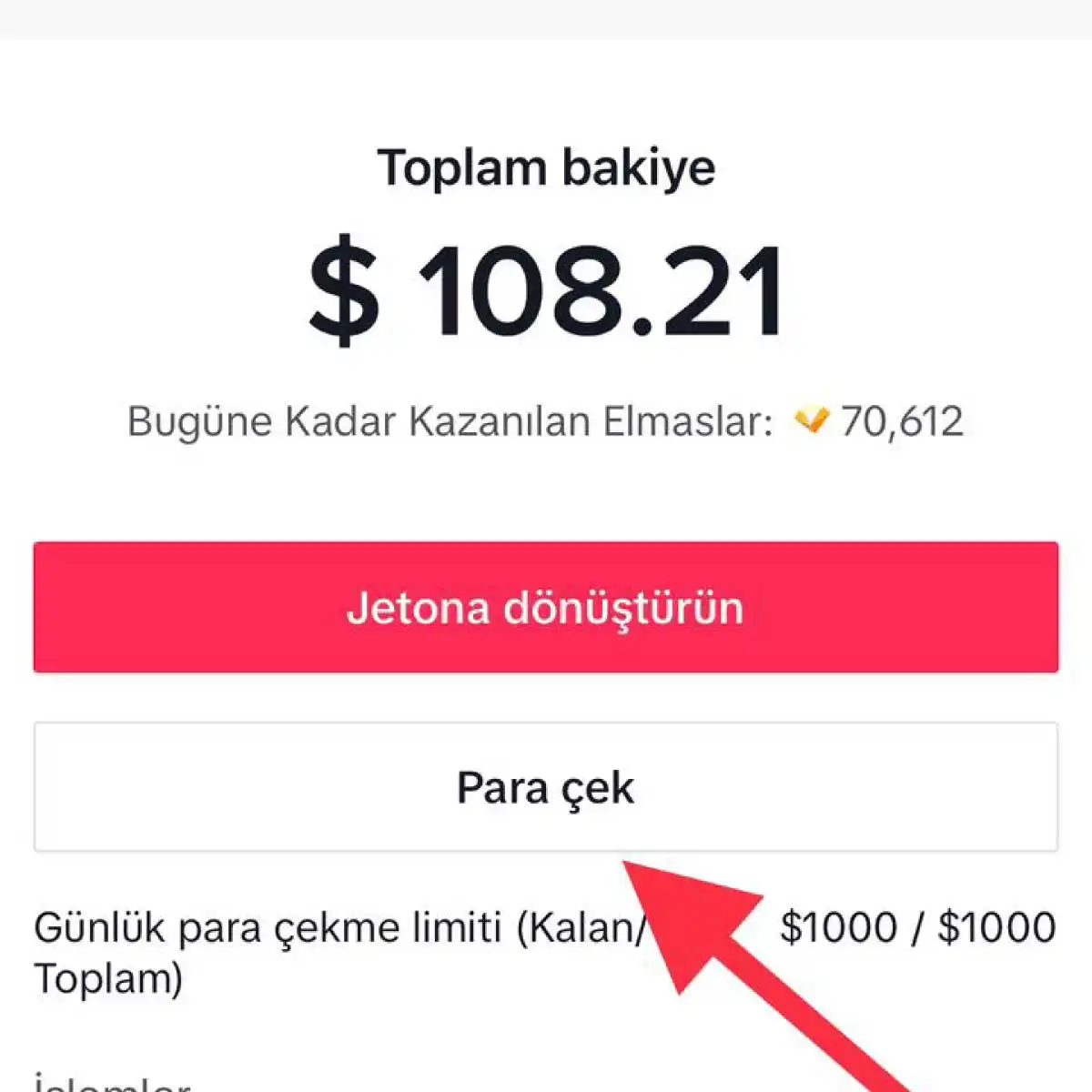
4. Para çekme işlemini gerçekleştirin
TikTok Creator Fund veya diğer monetizasyon araçlarıyla ne kadar kazandığınızı net bir şekilde izleyebilirsiniz. Hesabınıza yansıyan geliri ve kazanç faaliyetlerinizin performansını takip etmek için arayüz oldukça doğrudan. Para birikmeye başlar. Bir noktada TikTok, belirli bir minimum çekilebilir tutar eşiğine ulaştığınızda devreye girer. Bu eşiğe eriştiğinizde ödeme döngüsü tetiklenir ve para hesabınıza aktarılır.
Tam olarak bu eşiğin ne olduğu ve ödeme döngüsünün nasıl işlediği, TikTok’un resmi belgelerinde detaylandırılmıştır. Genellikle bu rakıp, platformun kurallarına göre değişebilen sabit bir miktardır. Hesap ayarlarınıza giderek bu bilgilere erişebilirsiniz.
Ödeme zamanlaması ve minimum limitler
Peki, para ne zaman hesabınızda oluyor? Bu sorunun cevabı, TikTok ödeme döngüsü ile doğrudan bağlantılıdır. Çoğu durumda, ay sonunda hesaplanan gelir, ertesi ayın belirli bir haftasında işlenir. Ancak bu takvim, bulunduğunuz bölgeye ve kullandığınız ödeme yöntemine göre kayabilir.
Minimum çekilebilir tutar hakkında sıkça sorulan sorulardan biri, bu limitin neden mevcut olduğuyla ilgilidir. Bu eşik, işlem maliyetlerini yönetmek ve dolandırıcılığı önlemek için bir güvenlik katmanı olarak işlev görür. Limit altındaysanız, para hesabınızda bekler. Limit üstüne çıktığınızda, “Çek” butonu aktif hale gelir.
Hangi ödeme yöntemleri destekleniyor?
Genellikle TikTok, para çekme işlemi için aşağıdaki yöntemleri kabul eder:
- Banka havalesi
- PayPal
- Bazı bölgelerde yerel ödeme ağ geçitleri
Hangi yöntemin kullanılabilirliği, hesabınızın bağlı olduğu ülkeye ve TikTok’un o bölgedeki iş ortaklıklarına bağlıdır. Ayarlar bölümüne gidip “Kazançlar” veya “Finans” sekmesini açtığınızda, size sunulan seçenekleri göreceksiniz.
Ödeme yönteminizi doğru girdiğinizden emin olun. Yanlış hesap bilgileri, paranın kaybolmasına değil, geri gönderilmesine veya işlemin askıya alınmasına yol açar.
Çekim talebinde nasıl bulunulur?
İşlem oldukça basittir. Uygulamada Kazançlar kısmına gidin. Orada “Çek” (Withdraw) butonunu göreceksiniz. Tıklayın, miktarı onaylayın ve ödeme yönteminizi seçin. Ardından onaylayın.
Talebiniz işleme alınır. Durumu aynı sayfadan takip edebilirsiniz. “İşleniyor” (Processing) veya “Gönderildi” (Sent) gibi statüler görürsünüz. Bankanıza yansımak birkaç gün sürebilir. Bu süre, bankanıza ve kullandığınız yönteme göre
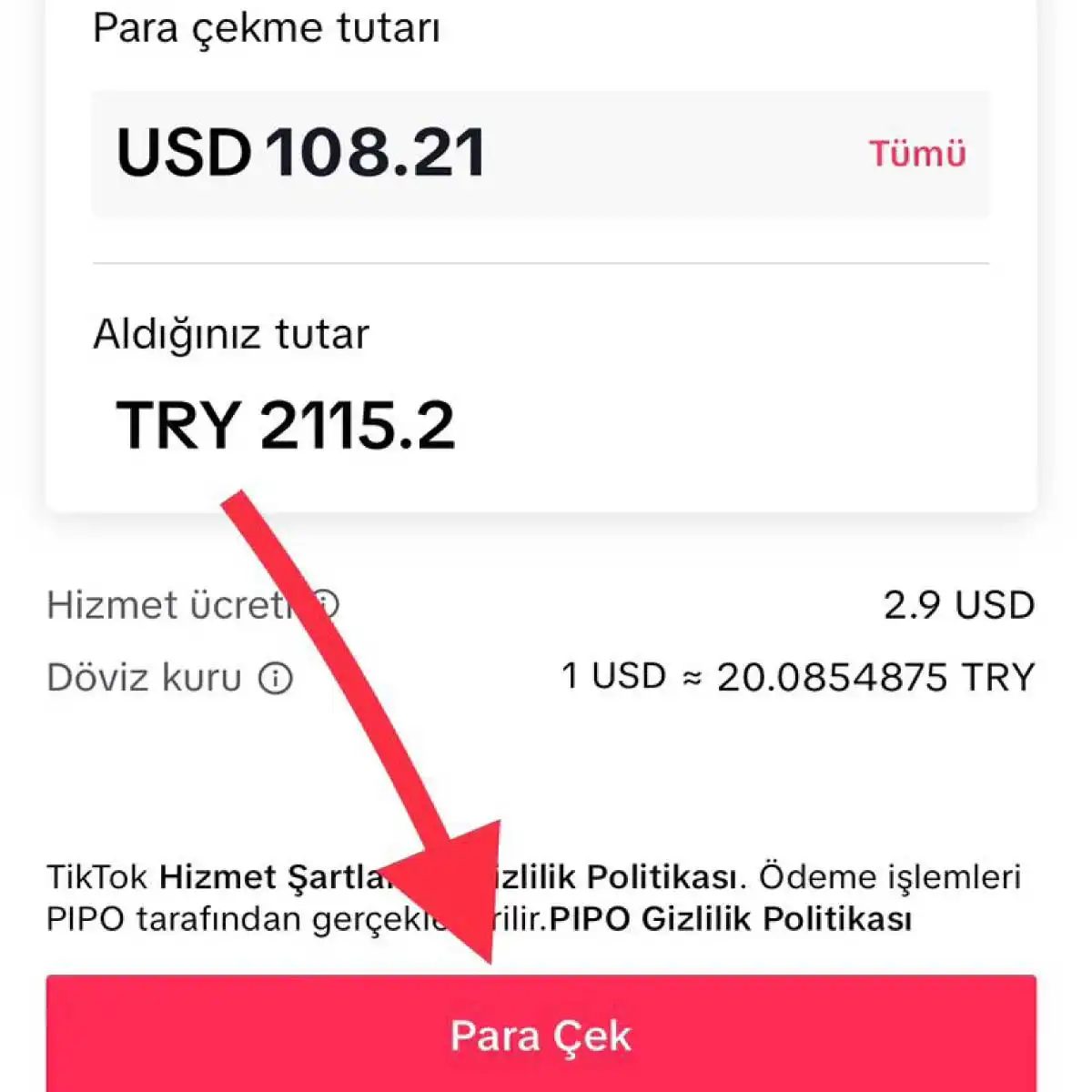
How to actually get your money out of TikTok
Once you cross that threshold and your payment settings are sorted, you are ready to pull funds. The interface is straightforward. You pick a method. Usually, that means PayPal or a direct bank account transfer. TikTok supports these two primarily. Choose the one that fits your setup, enter the required details, and hit confirm.
Then you wait.
Processing times vary. There is no fixed speed guarantee. It depends on TikTok’s internal policies and your local banking infrastructure. This is where things get tricky. If the money does not show up, you need to track the transaction. Do not ignore missing payments. Contact TikTok support immediately if delays stretch beyond the expected window. Keeping an eye on current withdrawal procedures is part of the job. Policies shift. Procedures update. Staying informed prevents headaches later.
How to earn money on TikTok in the first place
Getting the payout is only half the story. You have to make the money first.
Handling TikTok Withdrawal Glitches
So you’ve got the money in your account. The Creator Fund checks clear, the brand deals are paid out, the virtual gifts have been converted. And now comes the part nobody talks about until it goes wrong. The withdrawal process.
Sometimes the money sits there. It doesn’t move. You hit the button, see the “processing” status, and wait. Days pass. Weeks maybe. That’s when the panic sets in. Is the bank broken? Did TikTok freeze your funds? You’re not alone. Thousands of users report similar delays.
The most common culprit? Verification issues. TikTok is strict with identity checks. If your ID photos were blurry, or if the name on your bank account doesn’t exactly match your TikTok profile, the system flags it. The payment gets held. It’s not a punishment. It’s a security protocol. But it feels like one.
Check your email. TikTok sends alerts when documents need re-uploading. Ignore them, and the funds stay stuck. Fix the profile details. Ensure the legal name matches your financial records. Then wait. Usually, the system re-processes the request within 24 to 48 hours after the correction.
Why Your Payout Might Be Rejected
There’s another reason payments bounce. Minimum thresholds. You can’t withdraw $1.50. TikTok requires a certain balance before it releases funds. For the Creator Fund, that’s typically $50. For live gifts, it might differ slightly depending on your region.
If you’re just under the limit, the system won’t let you request a withdrawal. You have to earn more. It’s frustrating if you’re close. But there’s no workaround. No “early release” button. Just keep creating.
And then there’s the bank issue. Not TikTok’s fault, but it looks like it is. You used an outdated routing number. Or your bank rejected the transfer because the sender name looked weird. “TikTok Ltd” might trigger a fraud filter at some smaller banks.
If the money bounces back to TikTok, you’ll see a notification. The funds aren’t gone. They’re back in your wallet. Just retry the withdrawal with a verified bank account. Sometimes, switching to a different bank or using a direct transfer instead of an ACH check helps.
Comparing Withdrawal Methods: Speed vs. Fees
Which method is fastest? That depends on where you live.
- Direct Bank Transfer: Usually takes 3 to 7 business days. Free of charge for most users. Best for larger amounts.
- PayPal: Often faster. 1 to 3 business days. But check your local fees. Some banks charge for receiving international transfers from PayPal.
- Wallet Transfers: In some regions, TikTok allows transfer to other social platforms or local digital wallets. This can be near-instant. But the exchange rate might eat into your earnings.
Don’t assume the fastest option is the best. Sometimes the slower bank transfer is more stable. Fewer glitches. Less chance of a transaction being flagged by a third-party service.
How to Track Your TikTok Earnings
You can’t just guess when the money is coming. You need to track it.
Go to your profile. Tap the menu. Find “Creator Tools” or “Monetization.” There’s a section for earnings. It shows your total balance, pending amounts, and past transactions.
If a payout is missing, this is where you start. Look at the date. If it’s been over 10 business days, contact TikTok support. Don’t DM your followers. Don’t post about it on Twitter. It won’t help. Use the in-app support chat.
Be specific. Include your username, the amount, and the date you initiated the withdrawal. Attach screenshots. Support agents deal with hundreds of tickets daily. Make it easy for them to help you.
Regional Differences in TikTok Cashouts
Here’s a nuance people miss. TikTok operates differently in every country.
In
Why Your TikTok Withdrawal Is Failing
Money should be easy to move. Why is it stuck in your virtual wallet?
Payment method errors are the biggest culprit. TikTok supports specific channels. Usually, that means PayPal or a direct bank account. If you are using anything else, you are likely hitting a wall. Double-check the data you entered. A single typo in an IBAN or PayPal email can freeze the transaction. If the error persists, switch methods. Or talk to support. Do not assume the system is broken. Assume your input is wrong first.
There is also the minimum withdrawal limit. You cannot take out zero dollars. TikTok sets a floor. You must hit that number before the button becomes clickable. If your balance is just below the threshold, you are stuck. Keep making videos. Keep engaging. The balance will grow. It is annoying, but it is the design.
Understanding Creator Fund Delays
The TikTok Creator Fund is the engine behind this revenue. It pays you for views. But it is not a real-time ATM. Payments have cycles. Sometimes, they slip. If you see a payment status that looks wrong, do not panic immediately. Check the current policy. Payment cycles change. If you are sure something is off, contact the TikTok support team. They can look at the backend. You can only guess from the front end.
Account Verification and Policy Blocks
TikTok watches your content. If you violate community guidelines, your ability to withdraw money might get blocked. This is not a technical glitch. It is a policy enforcement. You might need to complete identity verification. Or you might need to remove violating content. If you are flagged, the path is clear. Fix the violation. Verify your identity. If the block remains, escalate to support. This is where the human element comes in. Automated systems flag accounts. Humans can override those flags if the evidence is weak.
TikTok Minimum Withdrawal Amount Details
How much do you actually need? The standard minimum is $9.
That is the floor. Below $9, you cannot request a withdrawal. But here is the catch that many creators miss. Every withdrawal comes with a $3 transfer fee. So if you withdraw exactly $9, you keep $6. If you are banking on that $9, you are doing some tight math. It is better to wait until your balance is higher. The fee is fixed. The more you withdraw, the lower the percentage cost.
How to Withdraw Money from TikTok
The process is linear.
- Apply to the TikTok Creator Fund.
- Get accepted.
- Configure your payment settings.
- Reach the minimum balance.
- Initiate the transfer.
You cannot skip steps. If you have not set up a PayPal or bank account in the settings, the withdrawal button will not work. Go to your settings. Ensure your payment details are accurate. Then, wait for the balance to hit $9.
TikTok Creator Fund Eligibility Requirements
You cannot just apply and get paid. There are gates.
- Followers: You need at least 10,000 followers.
- Views: You need at least 10,000 video views in the last 30 days.
These are the hard numbers. If you are at 9,999 followers, you are out. If your views dipped below 10k in the last month, you are out. It is a moving target. Keep posting. Keep growing. The numbers fluctuate daily.
Supported Payment Methods for TikTok Earnings
What can you use?
- PayPal
- Bank Account
These are the primary rails. When you set up your payment profile, you choose one. Enter your details carefully. For banks, you need your account number and routing number. For PayPal, you need the email address associated with your verified account. If you are in a region where one method is unavailable, check TikTok’s regional support docs. The options can vary by country.
How Long Does a TikTok Withdrawal Take?
Time is relative here. It depends on the method.
- PayPal: Often faster.
- Bank Transfer: Can take several business days.
The process involves TikTok processing the request, then the financial institution processing the transfer. You do not control the bank’s speed. You only control when you click the button. Expect a few days. If it is more than a week, that is when you start digging into support tickets.
Troubleshooting TikTok Creator Fund Payment Issues
If the money does not show up, start with the basics.
- Check your payment settings in the app.
- Verify your identity status.
- Look for any policy violations on your account.
If everything looks good, open a chat with TikTok support. Provide your user ID. Explain the issue. Ask for a timeline. Support can see errors that are invisible to you. Sometimes, the payment was sent to the wrong email. Sometimes, it was held for review. You will not know unless you ask.
The system is complex. It involves third-party payment processors, bank holidays, and internal TikTok review teams. When something fails, it is rarely one single thing. It is usually a combination. Keep your records. Keep your communication with support. And remember, the $3 fee is always coming, no matter how smooth the transaction looks on your screen.