
The internet began with a whisper. Long before the algorithmic feed took over our lives, there was the chat room. It was the original social network, a low-fi digital town square that required zero bandwidth, no flashy graphics, and absolutely no patience for loading screens. You picked a handle. You logged in. You talked. It was text-based, immediate, and brutally honest.
Thirty years later, the landscape has shifted from simple text to complex, data-hungry ecosystems. We now spend hours curating digital personas, polishing bios, and optimizing profile pictures. Yet, the core human desire hasn’t changed. We still want real-time connection. We still want to bypass the asynchronous lag of email or the performative nature of public posts. We just want to talk.
Enter Chatango.com.
While most major platforms bolt on chat features as an afterthought, Chatango builds its entire identity around real-time communication. It’s not about the profile. It’s about the room.
How Chatango Works for Everyday Users
The platform operates on a premise that feels almost retro: create a space, invite people, talk. But the utility is modern and surprisingly broad.
For personal users, Chatango functions as a standalone social discovery engine. You can search for other users by specific criteria—location, age, gender—and initiate a conversation with a single click. It cuts out the friend request friction. You’re in the room. You’re talking. The interface is stripped back, lacking the “cumbersome bells and whistles” of giants like Facebook or MySpace, which makes navigation intuitive even for non-technical users.
For business owners, the value proposition shifts from socializing to support. A small business website might be static, informative, but silent. By embedding a Chatango chat room, that site becomes interactive. Potential customers can ask questions instantly. Support becomes conversational rather than transactional. It bridges the gap between “here is information” and “here is help.”
Why the Text-Based Model Persists
Why hasn’t this model vanished? Because it’s lightweight.
Modern social networks are heavy. They are slow. They demand attention. Chat rooms, by contrast, are efficient. They don’t require you to construct a narrative. You don’t need to edit a photo. You just type.
This simplicity offers several distinct advantages:
- Immediate Feedback: Unlike posting on a timeline where you wait for likes or comments, chat rooms provide instant replies.
- Privacy Control: Users can create public rooms for open discussion or private rooms for restricted groups. This flexibility is often more granular than what mainstream platforms offer.
- Embeddability: The chat widget can be embedded on external websites. This means your community doesn’t have to live inside a closed app. It can live on your blog, your product page, or your portfolio.
The Trade-Off of Simplicity
There is no algorithmic feed to keep you addicted. There are no targeted ads injected into your chat stream. The experience is purely functional. For some, this is a feature. For others, it feels empty.
But in an era of digital fatigue, emptiness can be a relief. You know exactly what you’re signing up for. You create a profile. You make a room. You talk to people nearby or across the ocean. Nothing more, nothing less.
Setting up an account is the bare minimum. You pick a name, set a password, and fill in the boring bits: age, gender, ZIP code, and email. The rest is up to you. You can leave the “About Me” section blank or write a novel. It doesn’t matter. The system only cares that you exist.
Once you’re in, the Main Profile box becomes your digital billboard. You can drop in videos, music players, photos, and links. It looks like every other social network out there. But here is the trick. Chatango’s search engine relies on keywords. If you just say you are “laid back,” you are invisible. Specificity wins. List your hobbies. Use exact terms. This is how you actually find people who share your niche interests.
After the profile is live, you get a direct URL: http://username.chatango.com. This is your anchor. From here, you can tweak the aesthetic. Change the colors. Swap fonts. Add skins. Install add-ons like MP3 players. It is your space. Customize it until it matches your vibe.
Seamless integration on external sites
The real power of Chatango doesn’t stay on their servers. It moves. You can embed a public or private chat room directly onto your own personal website. This lets you moderate conversations outside their platform. You take control. You decide who talks. You decide when it stops. This portability is the main draw for webmasters who want to build a community without hosting the infrastructure themselves.
Managing offline communication
Chatting is simple. Click a profile. Type a message. But what if they are offline? You miss the conversation. To fix this, Chatango offers MessageCatcher. It is a small utility for Windows. It lives in the system tray. When someone leaves you a message while you are away, the icon alerts you. It works like voicemail for chat rooms. You log back in later. You read the missed chats. You respond.
Note the limitation. MessageCatcher only runs on Windows. Mac users and Linux users are out of luck. You have to rely on the web interface. There is no native desktop client for other operating systems.
Privacy and blocking tools
Not everyone wants to talk to everyone. Chatango acknowledges this. The Settings menu includes a block feature. Stop unwanted users from messaging you. The privacy controls are also robust. You can hide your profile from search results. You can stop receiving offline messages. You can remove your profile picture from public view. These settings give you boundaries. They prevent spam. They keep your digital footprint manageable.
Why keyword specificity matters
Many users ignore the search algorithm. They assume popularity is automatic. It is not. The search function is literal. If you do not use the right words, you do not appear. This is not a bug. It is the feature. You have to work for visibility. Be descriptive. Be precise. Avoid vague adjectives. Hobbies are better than moods. Specific locations are better than “travel.” This approach filters out noise. It attracts the right people.
The embedded chat room changes the game. You are no longer a tenant on someone else’s site. You are a landlord. You set the rules. You build the culture. This freedom is what keeps communities alive outside the main Chatango hub. It creates intimacy. It creates loyalty. It is harder to leave a room you helped build.
But there is a catch. Managing an embedded room requires effort. You have to moderate. You have to engage. If you stop, the room dies. It becomes a ghost town. The tools are there. The functionality is solid. But the human element remains the bottleneck. Can you sustain the conversation? That is the real question.

Portability is where Chatango actually shines. It isn’t about being the biggest social network. It’s about slipping a functional chat tool into other corners of the web. You can drop a group room or a MINI box into Facebook profiles, eBay stores, or personal blogs.
Embedding Group Chat Rooms
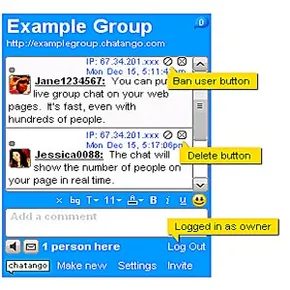
Setting up a Chatango group chat room takes seconds. Click “Add group page to your web page,” then fill in the name, URL, and description. That’s it.
The interface lets you tweak fonts, colors, and box sizes to match your brand. These rooms are public. Anyone, even non-Chatango users (known as anons ), can jump in. Unless moderators shut them out, the conversation flows freely.
Embedding is flexible. Chatango can automatically inject the app into platforms like MySpace, Friendster, and Facebook. If you run a personal blog, you can manually paste the HTML code directly into your site’s source. No plugins required.
MINI Boxes for Tight Spaces
Group chats need room. If your webpage is cramped, a MINI Chatango box is the answer. It works the same way but takes up less screen real estate.
Customization options remain. You control the size, font, and color scheme. The Settings menu also offers stricter control. You can block specific users or filter out profane language before it hits the chat log.
If the crowd gets too loud, you don’t have to manage it alone. Group owners can appoint other moderators. It scales with your traffic.
The Always-On Chat Button
Sometimes you don’t want a full window cluttering up your layout. A Chatango chat button solves that. It advertises real-time availability without dominating the page.
Click the button, and a pop-up window opens. Clean. Minimal.
Visual cues handle the status updates. A green dot means the user is online and ready to chat. Gray means they are logged out or away. But here’s the thing: even if the button is gray, visitors can still send a message. It waits for the owner to return.
Why This Matters for Everyday Users
Chatango isn’t the most robust social networking site out there. It doesn’t have deep search filters for hunting down friends with niche interests. For that, you need larger platforms with detailed algorithms.
But for immediate communication? It works. Uploading a group or MINI chat to a profile cuts out the lag. No waiting for email replies. No refreshing forums. Just text, in real time.
It fills a specific gap. Not everyone wants a full social network. Some just want a place to talk, embedded right where their audience already hangs out.
Lots More Information
Related HowStuffWorks Articles
- Are people more honest or dishonest on social networks?
- What is a social networking site?
- Top 5 Tips for Using Twitter
- Top 5 Niche Social Networks
- 10 Things You Should Never Share on Social Networks
Sources
- “Top questions about Chatango.” Chatango.com. (July 14, 2009)http://chatango.com/page?FAQ