Comedian George Carlin used to riff on the human compulsion to accumulate “stuff,” only to realize we need massive warehouses just to keep it all. Update that routine for 2024 and the premise holds. People don’t just buy clutter anymore. They hoard digital files. And just like physical goods, that data eventually outgrows the space it lives in.
For many users, local storage has become a bottleneck. You buy bigger hard drives. You fill them. Then you buy external drives. Then you delete entire folders of old photos just to fit a new song. It’s a cycle. But a growing number of people are stepping away from physical media entirely. They’re turning to cloud storage.
Despite the meteorological name, this isn’t about weather fronts. It’s about moving your data off your local machine and onto remote servers maintained by a third party. Your computer connects to these databases via the Internet. The physical hardware? It’s somewhere else. Probably in a warehouse.
This shift isn’t just about saving space. It’s about access. With cloud storage, your files live on the web. You can grab them from any device with an Internet connection. No thumb drives. No specific laptop required. You can even share projects collaboratively, turning solitary work into a team effort.
But convenience raises a messy question: Who actually owns the data?
The Ownership Debate
Information experts and computer scientists are still arguing over this. When you upload a file, does it belong to you? Or does it belong to the company running the server? What happens if that company goes bankrupt? Can they delete your data without asking?
There are no easy answers. Opinions vary wildly depending on who you ask and what their business model is.
How Cloud Storage Basics Work
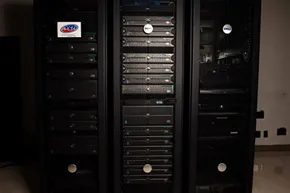
The landscape is crowded. Hundreds of systems exist. Some focus on specific niches like email or digital photography. Others are general-purpose repositories. The facilities housing this hardware are called data centers. Some are small. Others are so massive they fill entire buildings.
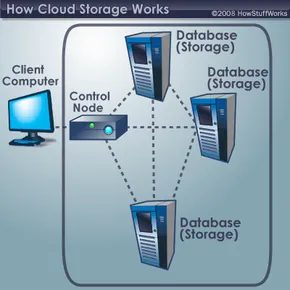
At its core, the process is simple. A client sends file copies over the Internet to a data server. The server records them. To retrieve the data, you log in via a web interface. The server either sends the files back to you or lets you manipulate them directly on the remote machine.
But one server isn’t enough. Computers break. Maintenance happens. Power fails. To prevent data loss, redundancy is key.
“Without redundancy, a cloud storage system couldn’t ensure clients that they could access their information at any given time.”
Most systems replicate your data across multiple servers. These servers often use different power supplies. If one line goes down, another picks up the slack. It’s a digital safety net.
Not everyone uses this for space. Some use it for backups. If your laptop gets stolen or your house floods, your data survives off-site. It’s the old advice: don’t put all your eggs in one basket. Just make the basket a server in Virginia.
Beyond Storage
Cloud storage is just one piece of the puzzle. It falls under the broader umbrella of cloud computing. This larger category includes not just storage, but remote processing power and applications installed on a network. You’re not just saving files. You’re running software that lives elsewhere.
Which providers are leading the charge? And how do they differ in security and speed? That’s the next layer.
The crowded landscape of cloud storage
The market is saturated. Hundreds of providers are fighting for your bytes, and the supply keeps growing faster than the demand. You likely use these services daily without labeling them as “cloud storage.”
Google Docs isn’t just a word processor. It uploads documents, spreadsheets, and presentations to Google’s servers. You edit them there. You publish them for others to read or edit. That’s cloud computing in action.
Email is another form of storage. Gmail, Hotmail, and Yahoo! Mail keep your messages on their servers. You access them from any device connected to the internet.
Photo sharing sites like Flickr and Picasa host millions of images. Users create online albums by uploading directly to the service.
Web hosting companies like GoDaddy or Hostmonster store the files for client websites. Social networks like Facebook store the pictures members post. Specialized services like Xdrive and Strongspace offer raw storage space for any digital data.
The pricing models are messy. Some are free. Others charge a flat fee. Some use a sliding scale based on needs. Generally, prices have dropped as more companies entered the industry. Most paid services still offer a free tier.
Does the demand support this many players? Some argue that if there is space to be filled, someone will fill it. Others predict a crash similar to the dot-com bubble of 2000. We’ll see.
The future of data ownership
A storm is brewing. Some predict a future where the entire web becomes a massive storage cloud. We will constantly upload and download data. The concept of data ownership will vanish. Everyone will have access to everything. Secrecy will cease to exist.
Others dismiss this. They see cloud storage as just another tool. It can be used to great advantage. It won’t bring about the end of civilization as we know it.
Who’s right? We’ll just have to wait and see.
Cloud storage security: How encryption and access controls protect your data
Reliability and security are the twin pillars holding up the cloud storage industry. If you are handing over your digital life to a third party, you need to know two things will hold true: the data will be there when you need it, and no one else will get their hands on it.
Most providers tackle the security side with a layered approach. It isn’t just one lock on the door. It is a system of checks.
Encryption is the heavy lifter here. It uses complex algorithms to scramble your information into gibberish. You can’t read those files without the specific encryption key. While it is theoretically possible for a hacker to crack this code, most don’t have the processing power to brute-force their way in. It is an uneven fight.
Then there is authentication. This is the gatekeeper. You need a username and password to get past it. But access doesn’t stop there. Authorization decides what you can do once you are inside. Many corporate systems use tiered access levels. A front-line employee might see only what they need to do their job. The head of HR? They have keys to the kingdom. This limits the blast radius if an account is compromised.
Despite these measures, the anxiety remains. The fear is that a hacker will find an electronic back door. Or worse, they will steal the physical hard drives themselves. A disgruntled employee with valid login credentials could also corrupt or delete data from the inside. Cloud providers know this. They invest heavily in security not just to protect data, but to protect their own survival. If they fail on security or reliability, they vanish. The market is too crowded for mediocrity.
Data center design: Why physical infrastructure matters
We often think of the cloud as a mystical ether, but it is actually steel, concrete, and copper. The physical design of a data center is just as critical as its network security.
Servers are valuable assets. They are expensive machines, yes, but the data they hold is priceless. Hackers don’t just want to crack passwords. They want physical access. If they can walk into a server room and pull a drive, the encryption on the remote server is irrelevant. That is why physical security protocols are stringent.
The power demands are staggering. A single server might not draw much current. Do you multiply that by hundreds or thousands of units? The electrical wiring must support that load without melting down. It is an engineering challenge of scale.
Heat is the enemy. Computers generate heat. Too much heat kills servers. Data centers require sophisticated cooling systems to keep the temperature stable. If the cooling fails, the hardware fails. And if the hardware fails, the data is gone.
Cloud storage FAQ
How does cloud storage work?
At its core, cloud storage relies on at least one data server connected to the internet. You send files over the web. The server saves a copy. When you want those files back, you access the server through a web interface. The server either sends the data back to your device or lets you view it directly from the cloud.
What are the advantages of cloud storage?
The biggest benefit is location independence. You can access your data from anywhere with an internet connection. You don’t need to carry an external hard drive. It also acts as a backup. If your local computer crashes, your files remain safe on the remote server.
What are some examples of cloud storage?
Google Drive is a prime example. So is Dropbox. Web email providers like Gmail, Hotmail, and Yahoo also function as cloud storage systems because they keep your emails and attachments on remote servers rather than just on your local device.
What is cloud storage with example?
Cloud storage is simply saving data to an off-site system maintained by a third party. You store data in a remote database. An internet connection allows you to send or retrieve files. When you upload a document to Google Drive, you are using cloud storage.
Related HowStuffWorks Articles
-
How Cloud Computing Works
-
How Shared Computing Works
-
How the Google Apple Cloud Computer Will Work
-
How Quantum Computers Will Work
-
How Web Servers Work
-
How Encryption Works
-
How Hackers Work
-
How Home Networking Works
-
How Internet Infrastructure Works
-
How Internet Search Engines Work
-
How Microprocessors Work
-
How Semantic Web Works
-
How Web Pages Work
More Great Links
-
The Globus Alliance
-
Grid Computing Info Centre
-
Grid Computing Planet
-
IBM Grid computing
-
Open Grid Forum
Sources
-
Brodkin, Jon. “IBM unveils ‘cloud computing.'” Network World. Nov. 19, 2007. Vol. 24, Iss. 45. pg. 10.
-
Cheng, Jacqui. “Google, Microsoft and Apple building online storage havens: you win.” Ars technica. August 12, 2007. Retrieved March 18, 2007. http://arstechnica.com/news.ars/post/20070812-google-microsoft-and-apple-building-online-storage-havens-you-win.html
-
Hickins, Michael. “Cloud Computing Gets Down to Earth.” eWeek. January 21, 2008. pg. 14.
-
“IBM Introduces Ready-to-Use Cloud Computing.” IBM. Nov. 15, 2007. http://www-03.ibm.com/press/us/en/pressrelease/22613.wss
-
Lohr, Steve. “Cloud Computing and EMC Deal.” The New York Times. Feb. 25, 2008. pg. C 6.
-
Lohr, Steve. “Google and I.B.M. Jon in ‘Cloud Computing’ Research.” The New York Times. Oct. 8, 2007. pg. C 8.
-
Lohr, Steve. “I.B.M. to Push ‘Cloud Computing,’ Using Data From Afar.” The New York Times. Nov. 15, 2007. pg. C 7.
-
Markoff, John. “Software via the Internet: Microsoft in ‘Cloud’ Computing.” The New York Times. Sep. 3, 2007. pg. C 1.
-
Naone, Erica. “Computer in the Cloud.” Technology Review. Sept. 18, 2007. Retrieved March 12, 2008. http://www.technologyreview.com/Infotech/19397/?a=f
-
Swanson, Bret and Gilder, George. “Unleashing the ‘Exaflood.'” Wall Street Journal. Feb. 22, 2008. pg. A 15.